What Does the Teams Plugin Do?
Thanks to tenfold’s deep integration with Microsoft 365, managing memberships in Microsoft Teams is just as easy as it is to control SharePoint permissions, Exchange Online mailboxes and user accounts in Entra ID. All MS Cloud resources and services are fully integrated with tenfold’s central user and access management system.
For MS Teams, this means tenfold automatically adds new users to the correct team, based on associated roles, and will modify memberships if any changes occur (for example, when an employee moves to another department or leaves the company).
Users can send in requests for other privileges or team memberships directly using tenfold’s built-in self-service platform. tenfold further logs all resulting changes and ensures that all permissions are subjected to regular user access reviews.
Essentials 365 Edition
The Microsoft Teams plugin is part of tenfold’s Essentials 365 Edition.

Manage Guest Users in Teams
You can also use tenfold’s self-service portal to invite guest users to Microsoft 365. Such requests must be approved by the associated data owner(s). To make admin life easier, tenfold highlights active guest users and their licenses in the dashboard.
To ensure that guest accounts in Entra ID are still needed, they can also be included in periodic access reviews.
See Shared Files
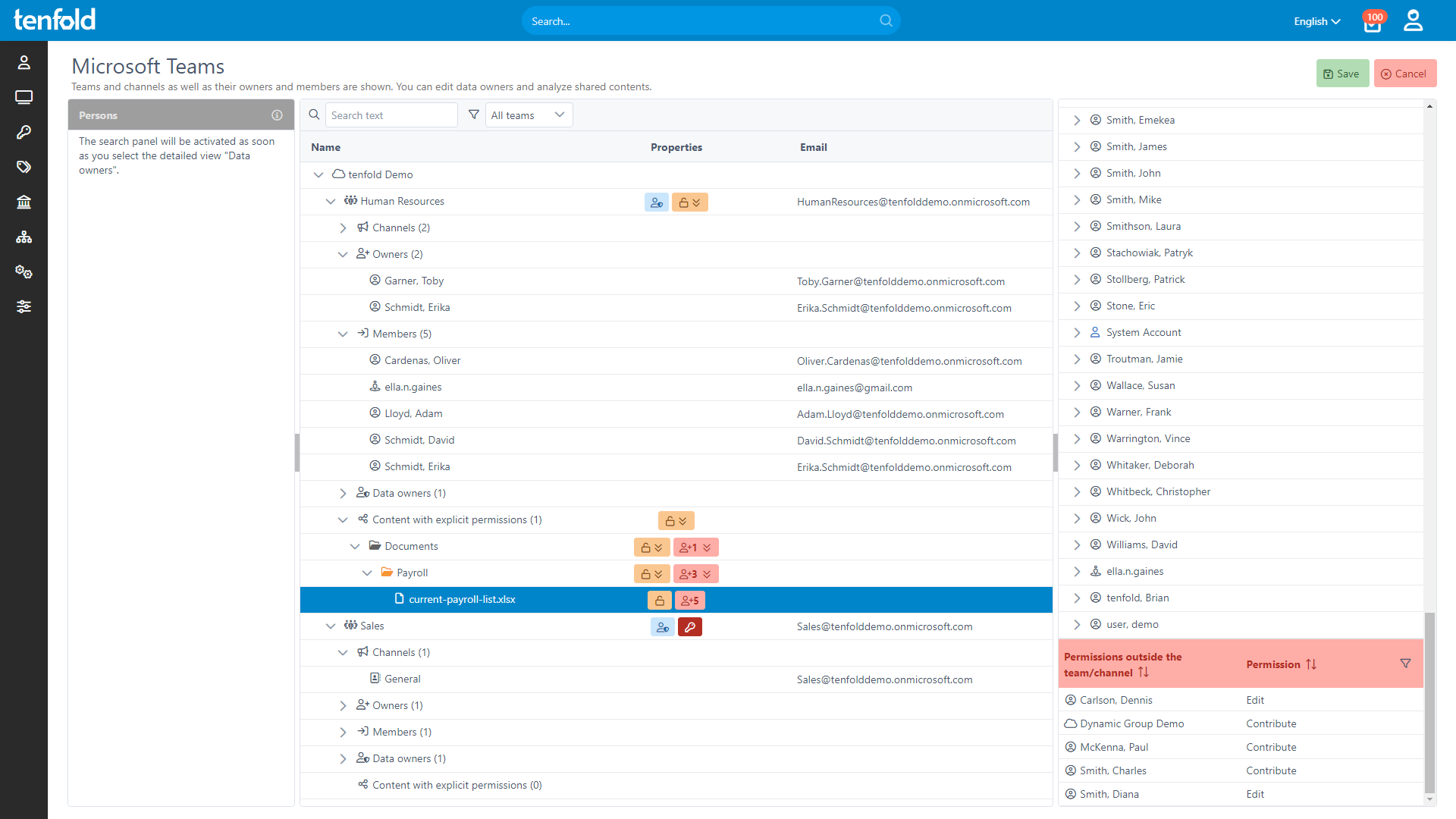
While Microsoft’s built-in tools do not allow you to track what information is being shared through Teams and by whom, tenfold provides a clear and central overview of Microsoft 365 file sharing.
Through a set of helpful filters, you can quickly identify assets shared either internally or externally through Teams, OneDrive or SharePoint. tenfold also allows you to carry out access reviews for shared content in Microsoft 365, prompting users to confirm whether the people they have shared files with still require access.
Features
Add, remove and modify users in Teams.
Changes are implemented automatically based on user lifecycles.
Team memberships and privileges can be requested via self-service portal.
Requests are approved by data owner(s) as defined in the approval workflow.
Admins can see which files are being shared in which teams.
Visualization of file access: What information can guests and external users view?
Create periodic or event-based access reviews for shared content.
Prompt data/channel owners to review who has access.
Permissions and sharing links that do not pass the review are automatically revoked.
Protect against oversharing and lingering cloud access.
tenfold at a Glance
Complete Visibility
Gain full insight into access rights – from individual files to system-level oversight.
Centralized Governance
Govern access in Active Directory, Microsoft 365 and beyond through a single platform.
Fast Implementation
Achieve complete integration faster with our no-code platform and off-the-shelf plugins.