


Stop Your Users From Oversharing
The ability to easily share documents with others is one of the biggest strengths of cloud collaboration suites like Microsoft 365. But apps like Teams and OneDrive also make it easy for users to overshare: Giving access to more people than needed or for longer than intended.
Microsoft’s native tools make it impossible to keep track of who has access to cloud documents. With tenfold, you can end oversharing before it becomes a problem and regain control of shared content.
Full Visibility Into Guest Access & Shared Content
Accounts and group memberships are just the tip of the iceberg.
tenfold provides in-depth governance for M365 down to individual shared files and unstructured data.
See the Full Picture
Get a breakdown of all cloud permissions
Centralized reporting for all M365 apps
Track changes with historical data
Secure Shared Content
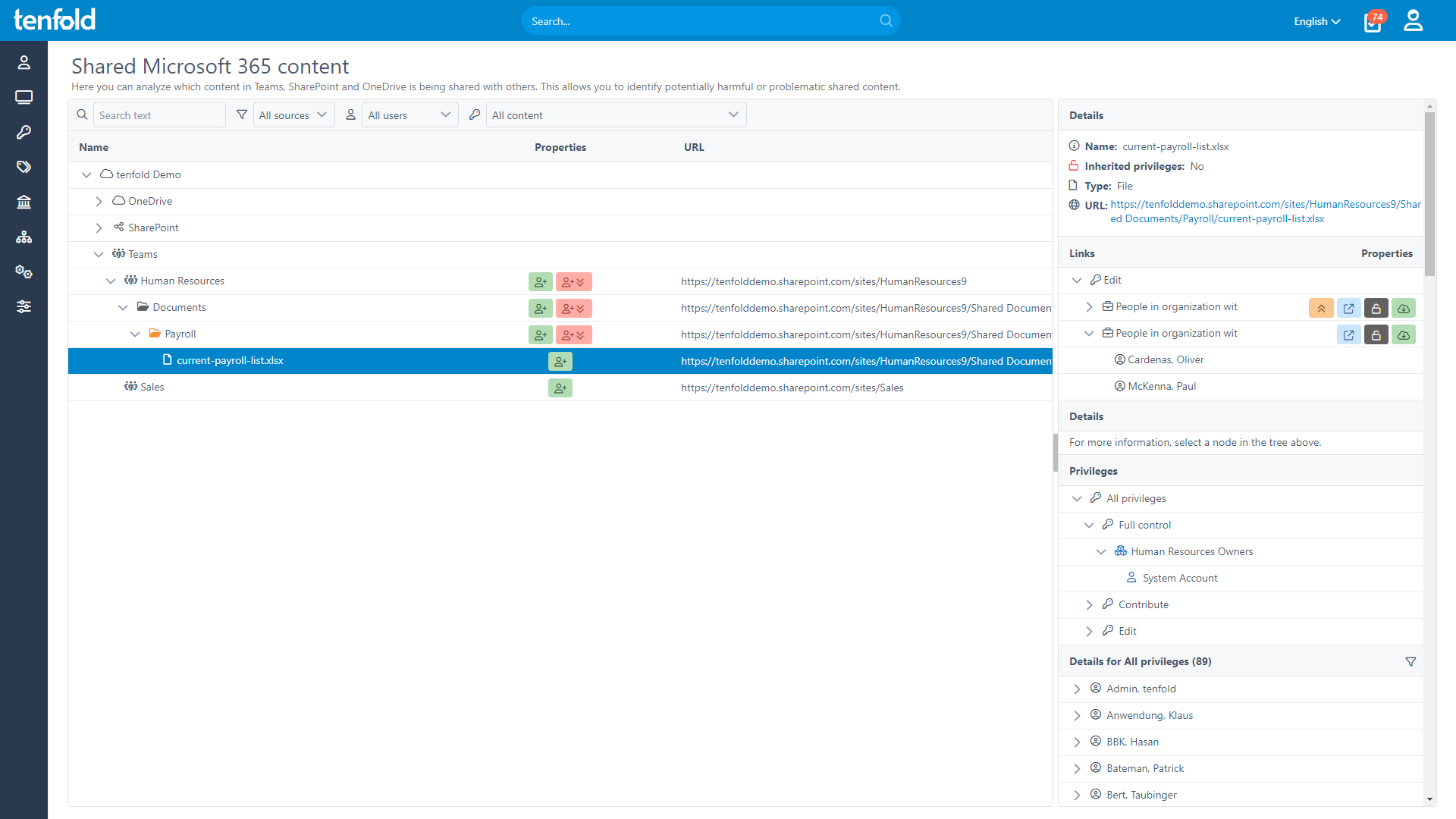
See who has access to shared content
Identify & fix problematic access quickly
Detect and manage external sharing risks
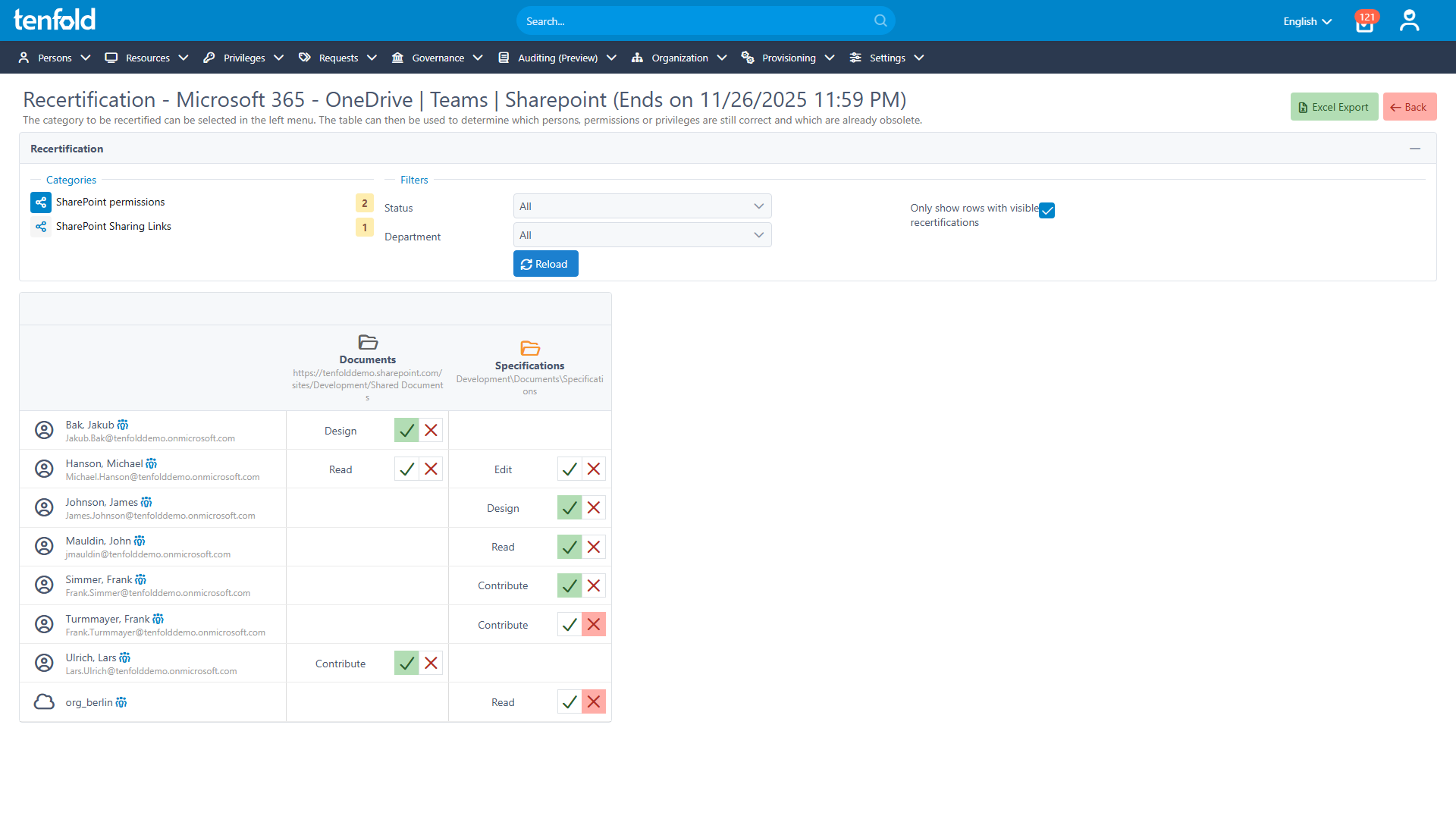
Review Cloud Access
Assign data owners for shared content
Schedule regular access reviews
Update user access based on outcome
In-depth Reporting for M365
Security begins with visibility: Go beyond users and groups with a clear breakdown of cloud permissions that goes down to the object level.
Full Control over Unstructured Data
Assign access based on roles or self-service workflows. Track changes through historical data. Keep privileges in check with a centralized overview of all Microsoft 365 permissions across Teams, OneDrive and SharePoint.
Access Reviews for Shared Content
Run regular reviews for access to shared content. tenfold automatically notifies data owners and updates privileges based on the review outcome – eliminating outdated and risky cloud access.
%
75
Lower IT Workload
%
95
Faster Access Provisioning
%
98
Recommendation Rate on Capterra
%
100
Privilege Creep Reduction
Why Choose tenfold?
tenfold’s quick setup, easy configuration and powerful features make it the ideal choice for anyone looking to securely manage user accounts and IT privileges. Our all-in-one solution combines identity and data access governance into one convenient and user-friendly package.
Download our IGA Comparison
Take a Free Tour
tenfold helps IT teams automate user access, streamline on/offboarding and stay compliant –
without manual work or complexity. Take our in-browser tour to see how it works.
Frequently Asked Questions
tenfold helps you manage shared content across Teams, SharePoint and OneDrive. It provides centralized, in-depth reporting, showing you exactly which files are being shared and with whom. Additionally, tenfold supports access reviews for shared content to help you stop unwanted or risky sharing. tenfold also allows you to govern access to (shared) mailboxes in Exchange Online.
Many organizations struggle with sharing in Microsoft 365. Since M365 offers no visibility into what is being shared, unwanted cloud access quickly grows out of control. It often starts out innocent, with access that serves a business need but persists longer than intended. Users might share documents with a freelancer, but then forget to revoke access later on. Or they might invite guests into a Teams channel without considering that they can now view everything in the Files tab.
With tenfold, organizations can use the same governance toolset to manage both their own staff and guest users. This means you can easily provision guest users thanks to role-based access, run access reviews to keep their privileges in check and automate offboarding with our lifecycle management.
Licensing for guest users in tenfold follows the same rules as Microsoft 365: Guest users only need a tenfold license if they have an active M365 app license assigned to their account.
Take the Next Step
Take an In-browser Tour of tenfold
Schedule a Live Demo With One of Our Experts
Put tenfold to the Test With Our Free Trial